Showing posts with label pdf. Show all posts

Wednesday, 29 August 2018

Show login name of the user

How to get the Username/ Login Name of the user who filled the form?

Due to security reason in PDF, this task becomes quite difficult to achieve and is only feasible for the intranet environment.
Firstly, you need to create a Trusted Function at the folder level script which checks the login name and returns the value to a form field. Here the hierarchy of the LC form is important. The result will map to the specific field in the form.

Place the following script in the Javascript folder of Acrobat or Reader depending on your requirement:
For Example:
C:\Program Files (x86)\Adobe\Acrobat DC\Acrobat\Javascripts
Or,
C:\Program Files (x86)\Adobe\Acrobat Reader DC\Reader\Javascripts


var TrustMe = app.trustedFunction(function(doc){app.beginPriv(); var IdentField = this.xfa.form.Form1.Page1.LoginUserName;IdentField.rawValue = this.identity.loginName;  app.endPriv(); });

Now, the main part is done and you just need to call the function which is placed at the folder level JavaScript.  

Put this script in the form:ready event of the form or any button to call the function
 

event.target.TrustMe(event.target);
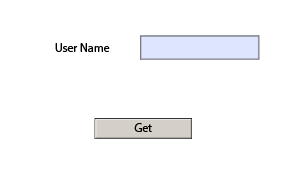
Show Login Name


Download the files from the following link and place the .js file at the JavaScripts folder mentioned above and then open the PDF and click "Get" button.

Source: https://www.dropbox.com/s/qwtvpsv68ocxdvy/GetUserName.zip?dl=0

Radio Button as mandatory field

How to make the radio button group as required.

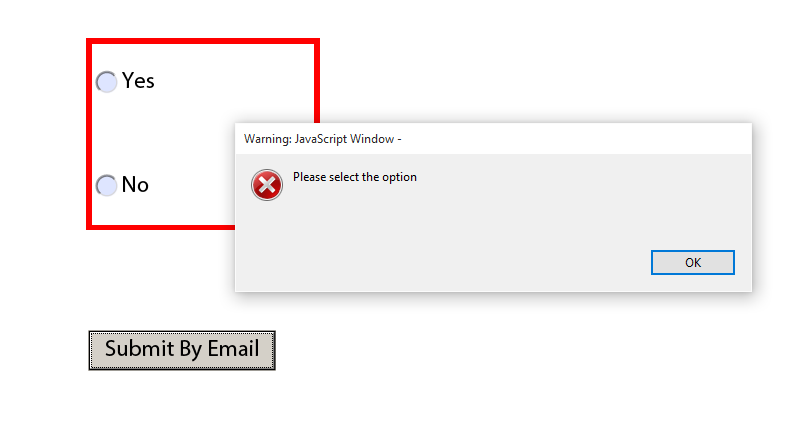
By default, LC Designer doesn't validate the NULL value of the Radio Button Group as Required Field. We need to use JavaScript to implement the logic.
In my example I used a button to first validate the Radio Button Group and if it is not NULL then it sends an email.

Radio Button Required
Snippet:

if(RadioButtonList.yes.rawValue == null && RadioButtonList.no.rawValue == null)
{
app.alert("Please select the option");
}

else
{
var eid = "test@test.com";
var sub = "test subject";
var bdy = "Sample Body";
event.target.submitForm({cURL:"mailto:" + eid + "?subject=" + sub + "&body=" + bdy ,cSubmitAs:"PDF",cCharset:"utf-8"});
}


Source: https://www.dropbox.com/s/912u03ku8au3fcx/RadioButtonRequired.pdf?dl=0

Tuesday, 28 August 2018

Populate same XML data in multiple fields

How to populate the same XML data in multiple fields in AEM Forms?

By design, the XML data tag can only be mapped to one field in the form. But still, if you bind it with multiple fields then at runtime it fills the field that comes first in occurrence.

The Global Binding is also not of much use here. So the only option left is JavaScript.

Through JavaScript, we can assign the raw Value of multiple fields together.

In my example, I am using a Table to show multiple rows with data.

Populate Data

Code Snippet
var rowNodes = Table1.disqualifiedIndvDetails.instanceManager.count;

for (var nNodeCount = 0; nNodeCount < rowNodes ; nNodeCount ++)
{

     page2.Table2.disqualifiedIndvDetails.instanceManager.addInstance();
    page3.Table3.disqualifiedIndvDetails.instanceManager.addInstance();
   
    xfa.resolveNode("page2.Table2.disqualifiedIndvDetails["+nNodeCount+"].name").rawValue = xfa.resolveNode("Table1.disqualifiedIndvDetails["+nNodeCount+"].name").rawValue
    xfa.resolveNode("page2.Table2.disqualifiedIndvDetails["+nNodeCount+"].disReason").rawValue = xfa.resolveNode("Table1.disqualifiedIndvDetails["+nNodeCount+"].disReason").rawValue
    xfa.resolveNode("page2.Table2.disqualifiedIndvDetails["+nNodeCount+"].numMonths").rawValue = xfa.resolveNode("Table1.disqualifiedIndvDetails["+nNodeCount+"].numMonths").rawValue
   
    xfa.resolveNode("page3.Table3.disqualifiedIndvDetails["+nNodeCount+"].name").rawValue = xfa.resolveNode("Table1.disqualifiedIndvDetails["+nNodeCount+"].name").rawValue
    xfa.resolveNode("page3.Table3.disqualifiedIndvDetails["+nNodeCount+"].disReason").rawValue = xfa.resolveNode("Table1.disqualifiedIndvDetails["+nNodeCount+"].disReason").rawValue
    xfa.resolveNode("page3.Table3.disqualifiedIndvDetails["+nNodeCount+"].numMonths").rawValue = xfa.resolveNode("Table1.disqualifiedIndvDetails["+nNodeCount+"].numMonths").rawValue
}


 Source File: https://www.dropbox.com/s/1s0i3hoqzpnycsz/MultipleData.zip?dl=0